Immich on NixOS: a private photo server
Designed and documented a self-hosted photo server for people without the expertise to assess the risks themselves — default-deny networking, features graded by threat model, and a book that marks the dangers plainly.
- Role — Author and maintainer. My own project
- Period — November 2025 onwards
- Outcome — Published with pre-built images and a documentation book; MIT licensed
Immich is an open-source alternative to Google Photos: you run it yourself, on your own hardware, and your photos stay on a disk you own. The software is good. Getting it running safely is the hard part, and it is hard in a way that falls hardest on exactly the people who most want it — someone who wants their family photos off a tech company's servers but who cannot reasonably be expected to evaluate a network security design.
That is the gap this project exists to close. It turns a Raspberry Pi and a USB drive, about £100–150 of hardware, into an encrypted photo server with automated backups and remote access, set up by following a book.
My motivation was personal first. I wanted my own data private, and then I wanted other people to be able to do the same without having to become me first.
Secure by default, exposed only on purpose
The default configuration never puts the server on the public internet. Remote access goes over a private network overlay, so the machine is reachable from your phone anywhere in the world but has no door facing the open internet at all. Photos sit on an encrypted drive, and backups to cloud storage are automated.
For most people that is the right answer, and it is what you get by doing nothing.
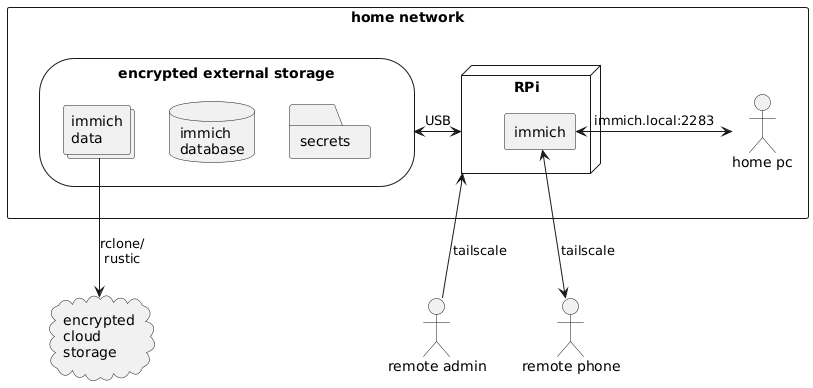
The default configuration. Every arrow crossing the home network boundary either starts inside it, or arrives over the private overlay. Nothing listens on the open internet.
But it isn't sufficient for everyone — share links don't work for people outside your private network, and some phones only allow one VPN at a time, so using a privacy VPN means losing access to your own photos. Those are real needs, and the right response is not to pretend the limitation away but to provide a deliberate, opt-in route that costs as little security as possible.
The exposed path
When you opt in, the server goes behind a reverse proxy that is configured to deny everything it has not been explicitly told to allow:
- Trusted devices authenticate with client certificates. The server runs its own small certificate authority, with the private key held on the encrypted drive, and issues a certificate per device. A device presenting a valid one gets full access.
- Everything else can reach only the photo-sharing endpoints, named one at a time in an allowlist. Any other request gets a 403.
- Failed logins and endpoint scanning get the source address banned. Repeated 401s look like password guessing; repeated 403s and 404s look like somebody mapping the API. Three separate filters watch for those patterns and ban the address for twelve hours.
Two details in that configuration are worth more than the rest of it put together, because they are the failure modes you only find by thinking about what happens when the mechanism is wrong rather than when it is right.
The first is the certificate check. The obvious setting looks like it means "a client certificate is required" — and it does, but it does not verify the certificate against anything, so any certificate passes. Getting this wrong gives you authentication that feels strict and admits anybody. The configuration uses the verifying mode, with a comment in the file saying why, so the next person to read it doesn't helpfully tighten it into a hole.
The second is the ban list. It's a file the banning service appends addresses to, which the proxy reads to decide what to block. An empty list, matched naively, matches every address — so the first time you deploy it, before anybody has been banned, it locks out the world. The list is seeded with a placeholder address so that it is never empty.
Neither of those is clever. Both are the difference between a security measure and the appearance of one.
Threat model as a design axis
People's circumstances differ, so the configuration is layered, not monolithic: the Nix modules let you opt into hardening, exposure, alternative backup providers and different installation routes, independently. Someone who only ever uses the server at home takes none of it. Someone sharing albums with family who refuse to install anything takes the exposure path and accepts what it costs.
The point is that the decision is presented as a decision, with the trade-off stated, rather than being made for the reader without telling them.
The book
The configuration is useless to the intended audience without the explanation, so the documentation is the larger half of the project — a book covering the whole lifecycle, not just installation: encrypting the drive, setting up the server, migrating an existing photo library, what happens on boot, routine maintenance, rotating certificates before they expire, and recovering when the hardware dies.
Risks are called out where the reader meets them, in the voice of a warning rather than a footnote. The chapter on exposing the server to the internet opens by saying that doing so adds risk, lists the measures that mitigate it, and tells the reader plainly that deviating from the setup means understanding how those measures work together first. The chapter on share links says that anyone with the link can see the photos.
I would rather a reader decline a feature than enable it without understanding it.
Reproducibility
The whole thing is NixOS, so a configuration describes the machine completely and the same inputs produce the same system. For the intended audience that matters more than it does for me: it means the instructions in the book correspond to what actually happens, and that a broken machine is recoverable by rebuilding it rather than by debugging it.
Pre-built images are published so that the first step is writing a file to an SD card rather than compiling an operating system on a Raspberry Pi.
Stack
NixOS, Caddy, Tailscale, mTLS, fail2ban, LUKS, rclone, rustic, mdBook.
Evidence
- hicklin/immich-rpi-nix — the repository
- The book — the documentation it ships with
- Exposing the server to the internet — the architecture, the risks, and the setup
expose-immich.nix— the reverse proxy, certificate authority and banning configurationimmich-remote.Caddyfile— the default-deny allowlist, and both comments described above